Automated Storage is changing how warehouses receive, identify, store, and retrieve goods. Instead of relying only on fixed shelving and manual travel, these systems combine software, sensors, conveyors, shuttles, and robotic equipment. A warehouse management system assigns each item a location. A warehouse execution system then coordinates movement, timing, and order priorities. The process can look simple: scan, store, retrieve, deliver. Behind it, however, hundreds of decisions happen within seconds.
The MHI 2024 Annual Industry Report found that 55% of supply-chain leaders planned to increase technology investment. It also identified labor availability as a continuing operational concern. Interact Analysis has projected strong growth in warehouse automation through 2027, driven by e-commerce and fulfillment pressure. These figures explain the interest in Automated Storage. They do not guarantee success. A poorly planned system can automate confusion.
John Santagate, a recognized robotics and supply-chain technology expert, describes the guiding principle clearly: “Automation should augment, not replace, human workers.” The statement matters on the warehouse floor. A picker may receive goods through an ergonomic workstation instead of walking hundreds of meters. Sensors can detect a misplaced tote. Software can expose bottlenecks before they become expensive delays. Still, integration is difficult. Legacy equipment, inaccurate inventory data, and weak employee training can reduce performance. The technology is impressive, but not magical. Effective Automated Storage depends on accurate data, suitable system design, and people who understand the operation. Perhaps that is the part many introductions overlook.
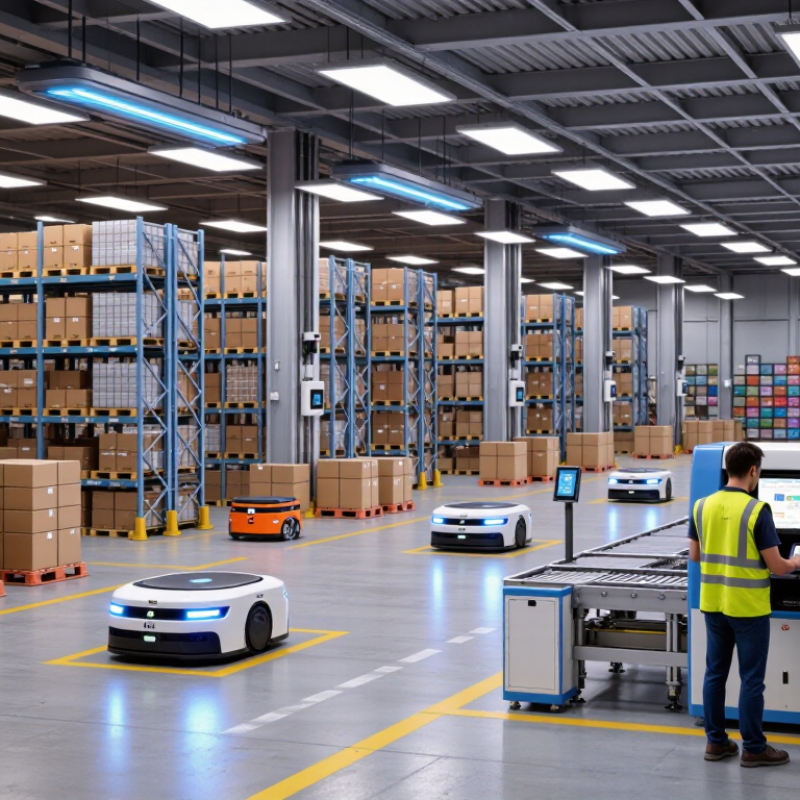
Automated storage is a warehouse system that stores and retrieves goods with limited manual handling. It combines storage structures, mechanical equipment, sensors, and control software. The goal is not simply to save space. It is to place items accurately, reduce unnecessary walking, and provide faster access to inventory.
In a typical operation, an inbound carton is scanned at a receiving station. The software records its size, weight, location, and item details. A lift, shuttle, or conveyor then moves it to an assigned storage position. When an order arrives, the system finds the correct unit and brings it to a picking area. Inventory records update during each movement, helping staff track stock with fewer paper checks.
The process looks seamless, but it depends on reliable information. A damaged label, incorrect measurement, or weak network connection can interrupt several tasks. Human judgment still matters. Workers inspect unusual products, handle exceptions, and respond when equipment behaves differently than expected. Safety sensors, maintenance schedules, access controls, and backup procedures also support dependable operation. Automated storage works best when product sizes and workflows remain reasonably consistent. That limitation is easy to overlook. A careful site assessment should come before installation, because a fast system can still create delays when its design does not match daily warehouse conditions.
Automated storage uses software-controlled machines, conveyors, lifts, shuttles, or cranes to place and retrieve inventory with limited manual handling. Greater usable height is one of the main ways these systems increase storage density, although the final capacity depends on building height, load size, fire regulations, and operating requirements.
The chart shows representative maximum storage heights commonly used for different automated storage configurations. Actual specifications vary by facility design and equipment type.
What Is Automated Storage And How Does It Work?
The Main Components of an Automated Storage System
An automated storage system combines physical equipment, software, and trained operators. Storage racks hold bins, cartons, pallets, or specialized loads. Each location has a defined address, much like a street number in a warehouse. Cranes, shuttles, or robotic vehicles move items between storage positions and workstations. Conveyors can transfer loads across receiving, picking, and dispatch areas. The layout must match the goods. Heavy pallets need different handling equipment than small cartons.
A warehouse management system decides where inventory should go and when it should move. A warehouse control system translates those decisions into equipment commands. Sensors check position, weight, movement, and access conditions. Barcode or radio-frequency identification devices confirm item identity. Human-machine interfaces show alarms and operating status to supervisors. Safety doors, scanners, emergency stops, and controlled access help protect people near moving machinery. Small details matter here.
In real installations, performance depends on accurate data and disciplined maintenance. A misplaced barcode can send the right machine to the wrong location. Poorly maintained sensors may create repeated stops. Operators still inspect equipment, clear approved faults, and verify unusual inventory results. Automation reduces repetitive travel, but it does not remove responsibility. Some systems also need manual handling during maintenance or unexpected demand. That human step may feel inefficient, yet it often exposes weaknesses that software alone cannot detect.
| System Component | Primary Function | How It Works | Typical Data or Materials Handled | Main Operational Benefit |
|---|---|---|---|---|
| Storage Racks and Locations | Provide the physical structure and defined positions for inventory. | Items are assigned to locations according to dimensions, weight, inventory rules, and retrieval frequency. Each position is identified by a location code. | Pallets Totes Cartons Bins | Uses vertical space efficiently and creates organized, traceable storage capacity. |
| Automated Storage and Retrieval Machine | Moves unit loads between storage positions and transfer points. | A crane, shuttle, or robotic vehicle receives a control command, travels to the assigned location, deposits or retrieves the load, and reports the completed movement. | Load ID Location ID Weight Movement status | Reduces manual travel and supports consistent, repeatable storage and retrieval operations. |
| Conveyors and Transfer Equipment | Transport goods between receiving, storage, picking, packing, and shipping areas. | Motorized rollers, belts, chains, lifts, or transfers move loads along programmed routes. Sensors confirm position and help control spacing. | Cartons Totes Pallets Destination codes | Creates a continuous material flow and limits unnecessary forklift or pedestrian movement. |
| Robotic Shuttle or Mobile Robot | Performs horizontal movement, put-away, replenishment, or order delivery within designated zones. | The robot follows navigation instructions, identifies the assigned load, and delivers it to a rack position, workstation, or handoff point. | Container ID Task queue Route data | Provides flexible movement and can support high-density storage or goods-to-person workflows. |
| Identification and Sensing Devices | Identify inventory and verify the condition and position of loads. | Barcode scanners, RFID readers, photoelectric sensors, cameras, scales, and position sensors capture information at receiving, storage, picking, and dispatch points. | Barcode RFID tag Dimensions Weight Presence | Improves inventory accuracy, load tracking, and equipment decision-making. |
| Warehouse Management System | Manages inventory records, orders, locations, and warehouse processes. | The system receives orders and inventory transactions, determines storage or retrieval requirements, assigns tasks, and maintains the logical inventory record. | SKU Quantity Lot Expiry date Order status | Provides inventory visibility and coordinates business rules such as FIFO, FEFO, and replenishment. |
| Warehouse Control System | Converts warehouse tasks into commands for automated equipment. | The control layer sequences movements, allocates equipment, manages routes, monitors equipment status, and exchanges confirmations with the warehouse management system. | Equipment status Task priority Routing data Error codes | Synchronizes different machines and helps maintain safe, efficient material flow. |
| Input and Output Stations | Provide controlled points for receiving goods into storage and releasing them to downstream operations. | Operators or upstream systems present a load at a station. Identification checks, dimension checks, and load confirmations are completed before the system accepts or dispatches it. | Inbound loads Outbound orders Quality checks | Standardizes handoffs and reduces errors at the boundary between manual and automated processes. |
| Goods-to-Person Picking Station | Delivers inventory to a worker instead of requiring the worker to walk to storage locations. | After receiving a pick request, the system retrieves the required container and presents it at an ergonomic workstation. The worker confirms the quantity and completes the pick. | Pick quantity SKU Order line Confirmation | Reduces walking distance and supports accurate, repeatable order fulfillment. |
| Safety and Access-Control Equipment | Protect people, inventory, and machinery during automated operation. | Fences, gates, light curtains, emergency stops, scanners, interlocks, and warning devices detect unsafe access or conditions and stop or restrict equipment when required. | Access state Safety zone Emergency status | Helps separate people from moving equipment and supports controlled maintenance and operation. |
| Power, Network, and Control Infrastructure | Supplies energy and communication connections for the automated system. | Electrical distribution, industrial networks, programmable controllers, servers, and backup systems keep equipment and software connected and operational. | Power status Network status Controller signals System alarms | Supports reliable communication, coordinated movement, monitoring, and system recovery. |
| Monitoring and Reporting Tools | Track performance, exceptions, inventory accuracy, and equipment availability. | Operational data is collected from software and equipment, then displayed through dashboards, alerts, logs, and reports for supervisors and maintenance teams. | Throughput Cycle time Utilization Downtime Exceptions | Helps identify bottlenecks, investigate errors, plan maintenance, and improve process performance. |
Automated storage systems combine software, machines, and controlled storage locations. Their purpose is simple: place inventory accurately and retrieve it with less manual travel. MHI’s 2024 Annual Industry Report identified robotics and automation as major supply-chain investment priorities, with 55% of respondents already using these technologies.
Operations usually begin with a warehouse management system receiving an order. The system checks stock, location, size, and priority. It then sends instructions to cranes, shuttles, lifts, conveyors, or mobile robots. Sensors confirm each movement. Barcode or RFID scans reduce identification errors. A warehouse execution system may also balance workloads and prevent equipment congestion.
The process looks smooth, but it depends on disciplined data. If a product is stored in the wrong location, automation can repeat the mistake quickly. That assumption fails. Staff still handle damaged cartons, unusual dimensions, and system exceptions. The handoff matters. Experience shows that clear labeling and routine equipment inspections often influence reliability more than impressive machinery.
Automated storage also uses real-time inventory records. When a unit leaves its position, the software updates availability and directs the next task. The International Federation of Robotics reported 541,302 industrial robot installations worldwide in 2023, showing the wider growth of automated operations. However, warehouse systems need different priorities, including safe movement, accurate picking, and flexible order handling. Faster is not always better. A poorly designed layout may create delays, energy waste, and difficult maintenance access.
What Is Automated Storage And How Does It Work?
Common Types of Automated Storage Solutions
Automated storage uses software, sensors, and mechanical equipment to place and retrieve goods with limited manual handling. A warehouse management system sends an order to the control system. Then, a crane, shuttle, lift, or mobile robot moves the required item to a collection point. The operator may receive a carton at waist height instead of walking through a long aisle.
Several solutions serve different storage needs. Automated storage and retrieval systems use cranes to handle pallets or bins in tall racks. Shuttle systems move containers along rails, making them useful for dense, fast-moving inventory. Carousels rotate shelves toward a worker, while vertical lift modules bring trays forward inside enclosed cabinets. Autonomous mobile robots can also transport bins between storage areas and workstations.
The choice depends on product size, order frequency, building height, and data quality. According to the MHI 2024 Annual Industry Report, 55% of respondents increased supply chain technology investment. DHL’s Robotics in Logistics Trend Report found that 73% of supply chain leaders expected warehouse robotics adoption by 2025. These figures show strong interest, but adoption is not automatically successful.
Small errors become expensive. A wrong item dimension can block a shuttle lane. Incomplete inventory data can send a robot to an empty location. Human checks still matter during commissioning, maintenance, and exception handling. Automation saves steps, not judgment.
Automated storage uses software, sensors, and machines to place and retrieve inventory with limited manual handling. A warehouse management system sends each task to cranes, shuttles, lifts, or robotic carts. Barcode or RFID scans confirm locations, while safety sensors slow equipment near people. In a typical high-bay aisle, a load enters on a conveyor, waits in a rack position, then returns when requested.
The strongest benefit is space efficiency. Tall racks can use vertical room that ordinary shelving leaves unused. Controlled movement also reduces walking, lifting, and picking mistakes. Operations may gain steadier throughput during night shifts, especially when demand is predictable. Accurate inventory records help supervisors spot shortages before an order reaches packing. Less travel matters. However, automation does not remove operational responsibility.
Installation can require major floor preparation, electrical work, software integration, and staff training. A sensor fault or network outage may stop several processes at once. Systems designed for one carton size can struggle with damaged, irregular, or rapidly changing products. Maintenance is not optional; dust, worn belts, and misaligned scanners create expensive delays.
The financial case may weaken when storage volume changes seasonally. It is not magic. A careful assessment should compare peak demand, product dimensions, access frequency, and recovery procedures. I would test unusual items, emergency retrieval, and manual backup before approving a design. Early projections can look impressive, yet real performance often depends on disciplined data and daily maintenance.
It stores and retrieves goods with limited manual handling. Racks, sensors, machines, and software work together. It is not magic.
A worker scans an inbound carton at a receiving station. The system records its size, weight, identity, and location. A lift, shuttle, or conveyor moves it into storage. Later, the system brings it to a picking area.
Common equipment includes racks, cranes, shuttles, lifts, conveyors, and mobile robots. Sensors monitor movement, weight, position, and access. Safety doors and emergency stops protect nearby workers.
Pallets, cartons, bins, and specialized loads can use different systems. Heavy pallets need stronger handling equipment. Small cartons may suit shuttles, carousels, or vertical lift units.
It reduces unnecessary walking and uses warehouse space more effectively. Workers may receive cartons at waist height. Inventory records update after each movement, reducing paper checks.
No. Workers inspect unusual products, handle exceptions, and respond to equipment problems. Human judgment remains important during maintenance and unusual orders. Automation saves steps, not responsibility.
A damaged label can misidentify a carton. Incorrect measurements may block a storage lane. Weak network connections or poorly maintained sensors can stop several tasks. Small errors become expensive.
It should examine product sizes, order frequency, building height, and workflow consistency. A careful site assessment should come before installation. A fast system can still create delays when its design does not fit daily conditions.
Not always. Accurate data, regular maintenance, and trained operators are necessary. The system may perform poorly when inventory information is incomplete. That limitation is easy to overlook.
Automated Storage refers to the use of computer-controlled equipment, software, and structured storage areas to receive, organize, locate, and retrieve goods with limited manual handling. An automated storage system typically includes storage racks or compartments, conveyors or lifts, robotic handling units, sensors, inventory databases, and management software. Together, these components coordinate the movement of items and maintain accurate records of their locations, quantities, and status.
These systems operate by receiving an inventory request, identifying the correct storage position, and directing the handling equipment to deliver or return the required item. Common solutions include automated retrieval units, vertical storage machines, compact shuttle systems, and robotic picking arrangements. Automated Storage can improve space utilization, speed, accuracy, workplace safety, and inventory visibility. However, it may require substantial investment, regular maintenance, staff training, and careful planning. Its effectiveness depends on product characteristics, operational volume, facility design, and the reliability of the supporting technology.